I recommend passing the tracked visitor ID into Paddle Checkout as customData.visitor_id and matching it to signed transaction.completed events in Grosslytics. That connects recorded Paddle payments to an acquisition source, but it does not produce normalized MRR or a built-in 90-day cohort LTV report. I would check a recurring event as well as the initial checkout before relying on the attribution.
Key takeaways
- Use customData in Paddle.js and inspect custom_data in the transaction event; the browser and webhook names differ.
- Paddle documents custom-data propagation to subscriptions and future transactions, but validate the actual recurring event you receive.
- Grosslytics removes the tax amount reported in the transaction and estimates the gateway fee; it does not read Paddle settlement earnings as exact net revenue.
- The current LTV view is historical and all-time, with identity limitations for Paddle; do not label it a 90-day cohort metric or forecast.
What do you need before opening Paddle Checkout?
You need a Paddle Billing product and price, an initialized Paddle.js integration, and a tracked visit with a Grosslytics visitor ID.
The examples follow Paddle’s documentation and the Grosslytics implementation. Before relying on them for live payments, run a test transaction and check the webhook payload you receive.
This guide covers Paddle Billing and transaction.completed, not legacy Paddle Classic events. Start with the Grosslytics setup flow, install the tracker and choose a reporting currency that matches the charge currency.
- Add the Grosslytics tracker to the acquisition and pricing pages.
- Load and initialize Paddle.js with your client-side token.
- Keep price selection and application access rules under your existing checkout controls.
- Configure a test-mode webhook destination.
- Plan to inspect both an initial and recurring transaction.
Use the tracker guide if you self-host or need Content Security Policy changes.
Step 1: How do you pass the visitor ID into Paddle.js?
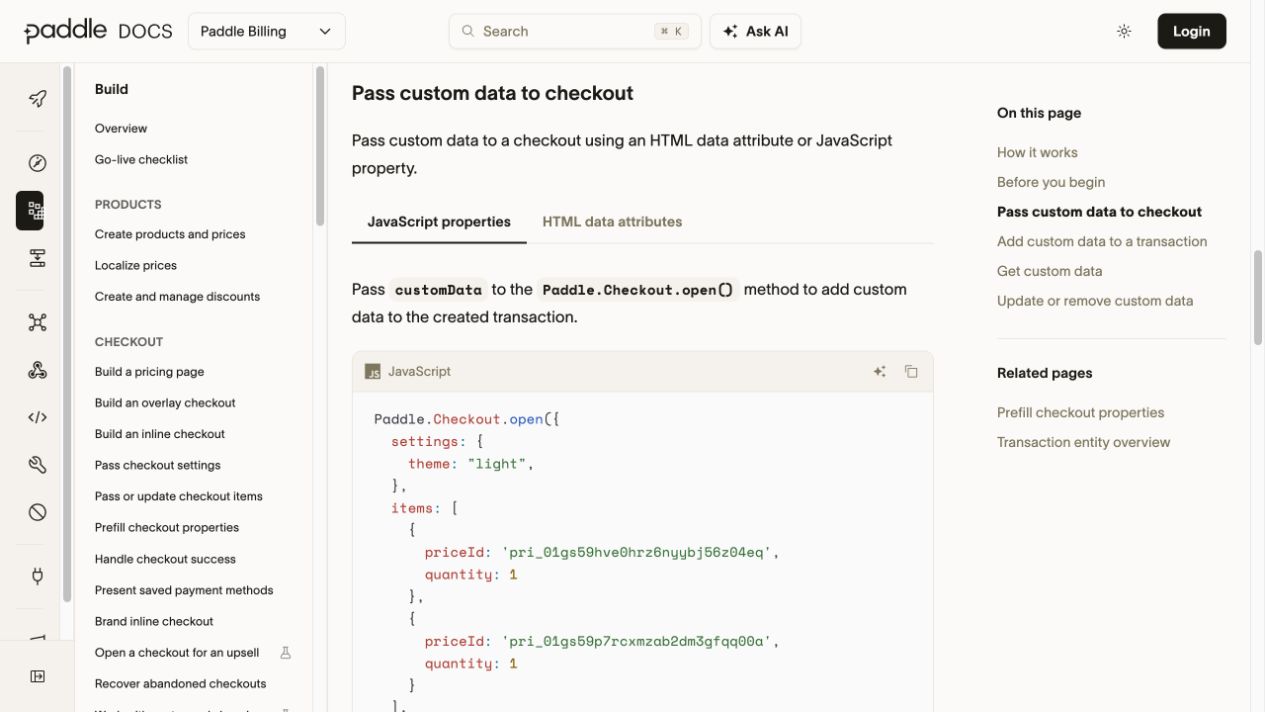
Read the tracked visitor ID after initialization and include it in the checkout’s customData object.
<script defer src="https://grosslytics.com/g.js"
  data-site-id="YOUR_SITE_ID"></script>
<script src="https://cdn.paddle.com/paddle/v2/paddle.js"></script>
In your existing client checkout code:
// Browser: initialize once, then call openCheckout from your buy button.
Paddle.Environment.set('sandbox');
Paddle.Initialize({ token: 'test_YOUR_CLIENT_SIDE_TOKEN' });

function openCheckout() {
  let visitorId = null;
  try { visitorId = localStorage.getItem('gl_vid'); } catch {}
  Paddle.Checkout.open({
    items: [{ priceId: 'pri_YOUR_RECURRING_PRICE_ID', quantity: 1 }],
    ...(visitorId ? { customData: { visitor_id: visitorId } } : {})
  });
}
Use your real sandbox client-side token and price ID, and change environment/token appropriately for production. If tracking is unavailable, the example still opens checkout without claiming attribution. Source: Paddle.Checkout.open parameters.
Paddle documents that transaction custom data is copied to the created subscription, then to future subscription transactions. In a transaction webhook the field is custom_data, not the Paddle.js spelling customData. Source: custom-data propagation.
The ID joins the payment to an existing visit; it is not an authentication credential. A source such as an SEO page or ad campaign still depends on the visit evidence and tags recorded before checkout.
Step 2: Which Paddle webhook should Grosslytics receive?
Configure transaction.completed, adjustment.created and adjustment.updated to reach the Paddle-specific endpoint and save the matching signing secret in Payments settings.
https://YOUR_ANALYTICS_DOMAIN/api/webhooks/paddle?siteId=YOUR_SITE_ID
The current handler reads the completed transaction ID, currency, reported totals, custom_data.visitor_id and origin. It recognizes a recurring payment when origin is subscription_recurring. Source: transaction.completed event.
| Field or control | Provider-side location | Current Grosslytics use |
|---|---|---|
| Visitor ID | data.custom_data.visitor_id | Matches the stored visit |
| Paid amount | data.details.totals.grand_total | Starting amount before tax exclusion |
| Tax | data.details.totals.tax | Removed from revenue when supplied |
| Currency | data.currency_code | Must match the site’s reporting currency |
| Recurring origin | data.origin | subscription_recurring marks a renewal |
| Signature | Paddle-Signature header | Checked against the raw body and destination secret |
Do not replace the raw payload with a reformatted JSON string before signature verification. Paddle describes its signature and timestamp checks in webhook signature verification.
The payment integration reference describes the current Grosslytics settings. A delivered webhook must still be inspected for the correct visitor, amount and currency before you call the attribution complete.
Step 3: How do you compare sources after a test purchase?
Open the source report and compare the matched payment under a consistent attribution model and reporting currency.
Start from a controlled campaign URL:
https://your-site.example/pricing?utm_source=google&utm_medium=cpc&utm_campaign=paddle-test
Complete a sandbox checkout, confirm that its completed transaction carries the visitor ID, and inspect the resulting source. Repeat with a recurring transaction rather than assuming a successful initial purchase proves later matching.
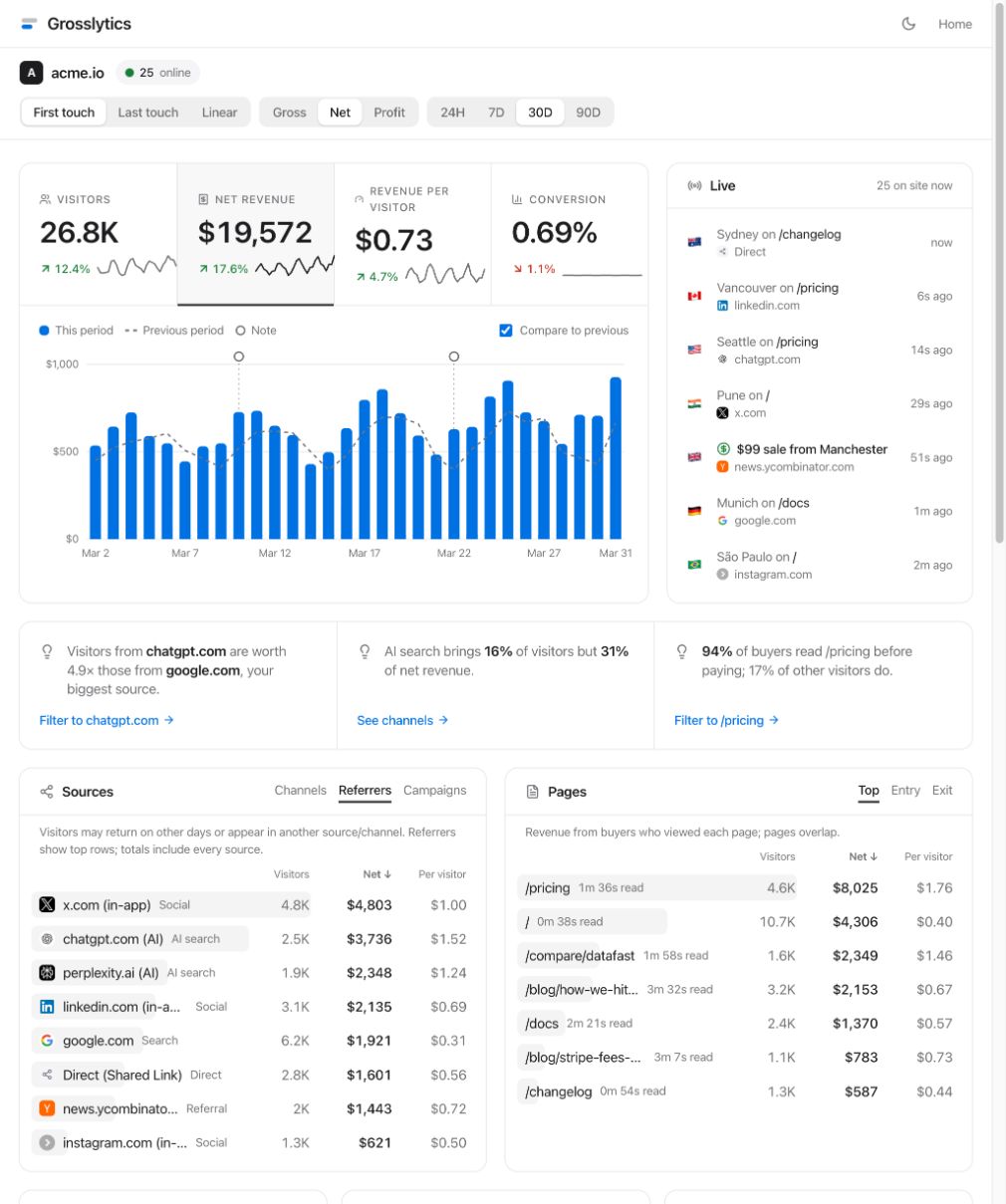
The dashboard definitions describe first-touch, last-touch and the first-last endpoint split, which can credit the same payment differently.
A page revenue report answers a different question from acquisition-source credit: visitors can read several pages before purchasing. Do not sum overlapping page rows as if each were an exclusive revenue allocation.
How are Paddle tax and fees represented?
The current implementation removes reported tax, then subtracts its configured fee estimate from the payment amount.
Consider an illustrative USD 120 payment containing USD 20 in tax. With the current 5% plus USD 0.50 fee assumption applied to the full payment, estimated fees are USD 6.50 and the resulting revenue after tax and estimated fees is USD 93.50.
paid = 12000 cents
tax = 2000 cents
estimated_fee = round(12000 * 500 / 10000) + 50 = 650 cents
revenue_after_tax_and_estimated_fee = 12000 - 2000 - 650 = 9350 cents
That calculation describes the application’s default, not your negotiated Paddle fee or exact payout. The current Paddle extractor does not use actual totals.fee or earnings as the stored fee amount. Approved full refunds remove a sale; partial refunds need separate reconciliation.
Mixed-currency payments are rejected rather than converted. Ad spend is a separate input, and subtracting fees and ad spend still excludes other business operating costs.
Is observed LTV the same as 90-day cohort LTV or MRR?
No: observed LTV is accumulated historical value, a cohort fixes an acquisition group and observation window, and MRR normalizes recurring subscription value.
Grosslytics’ current LTV report groups all-time successful net receipts by first-touch source and divides them by distinct customers using available identifiers. The Paddle extractor does not populate an email identity, so matching normally relies on visitor IDs; multiple browsers or cleared storage can affect the apparent customer count.
For an illustrative source with USD 300 in accumulated net receipts and two identified customers, observed LTV is USD 150. A 90-day figure might be different if some of those receipts occurred after the customer’s first 90 days.
observed_all_time_ltv = 300 / 2 = 150
normalized_monthly_value_of_annual_1200_plan = 1200 / 12 = 100
Selecting a 90-day traffic range does not turn the all-time LTV panel into a cohort report. A proper cohort analysis needs a stable subscriber identity, acquisition date, fixed observation cutoff and refund-adjusted payment history; use an appropriate export or reporting system for that requirement.
What should you test before using the report for acquisition decisions?
Reconcile a complete payment lifecycle with the provider records and keep unsupported metrics out of the interpretation.
- Confirm the visitor and transaction carry the same ID.
- Validate signature verification and successful ingestion.
- Check the currency and tax amount.
- Reconcile the fee estimate with actual provider charges.
- Test a recurring transaction and its source.
- Inspect an unmatched buyer and avoid inventing its source.
- Reconcile partial refunds and other adjustments separately; the handler only applies approved full refunds.
Keep revenue attribution, recurring receipts and cohort metrics distinct. Next, validate one initial and one recurring Paddle transaction before using the source report to allocate spend.
Frequently asked questions
Does Grosslytics calculate Paddle MRR?
It records supported completed transactions and identifies subscription_recurring origin. That is not the same as normalizing active subscriptions into a dedicated MRR metric.
Does choosing a 90-day range show 90-day cohort LTV?
No. The current LTV query is all-time by first source. Cohort LTV needs an acquisition group and a fixed observation period, not just a traffic date range.
Why is customData spelled differently in the webhook?
Paddle.js accepts customData, while Paddle transaction objects and webhook payloads use custom_data. Grosslytics reads the webhook field.
Does the net value equal my exact Paddle payout?
No. The current implementation excludes reported tax and subtracts a configured fee estimate. Settlement timing, actual fees, adjustments and refunds require separate reconciliation.